Preschool Management Software for Multiple Branches: A Practical Guide
Managing one preschool is challenging enough. When an education group operates multiple preschools or play schools, the complexity increases. Each branch may have its own admissions, fee collections, staff, attendance records and parent communication requirements. Without a connected system, the head office can struggle to understand what is happening across the organization.
Preschool management software helps bring essential administrative activities into a more organized digital system. For preschool groups, the right solution should do more than maintain student records. It should also help management monitor branches, improve operational consistency and make informed decisions using reliable information.
In this guide, we explain what preschool management software should offer, why multi-branch groups need centralized visibility, which features to evaluate and how to choose a system that can support future growth.
What Is Preschool Management Software?
Preschool management software is a digital platform that helps preschools manage administrative and academic operations, including admissions, student records, attendance, fees, staff information and communication with parents.
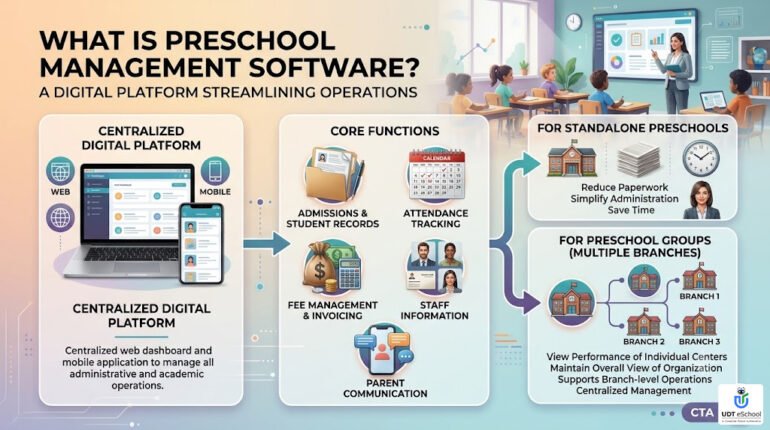
Depending on the system, these functions may be available through a centralized web dashboard, mobile applications or both.
For a standalone preschool, the main objective may be to reduce paperwork and simplify everyday administration. For a preschool group with several branches, the requirements are broader: management needs to see the performance of individual centres while maintaining an overall view of the organization.
A suitable preschool management system should therefore support both branch-level operations and centralized management.
Why Multi-Branch Preschools Need a Centralized Management System
When every branch maintains separate spreadsheets, registers or disconnected applications, the head office may have to collect information manually before it can understand the organization’s overall position.
Preschool administration should support the broader goals of quality early learning outlined by the Ministry of Women and Child Development’s Early Childhood Care and Education initiative.
This creates several challenges.
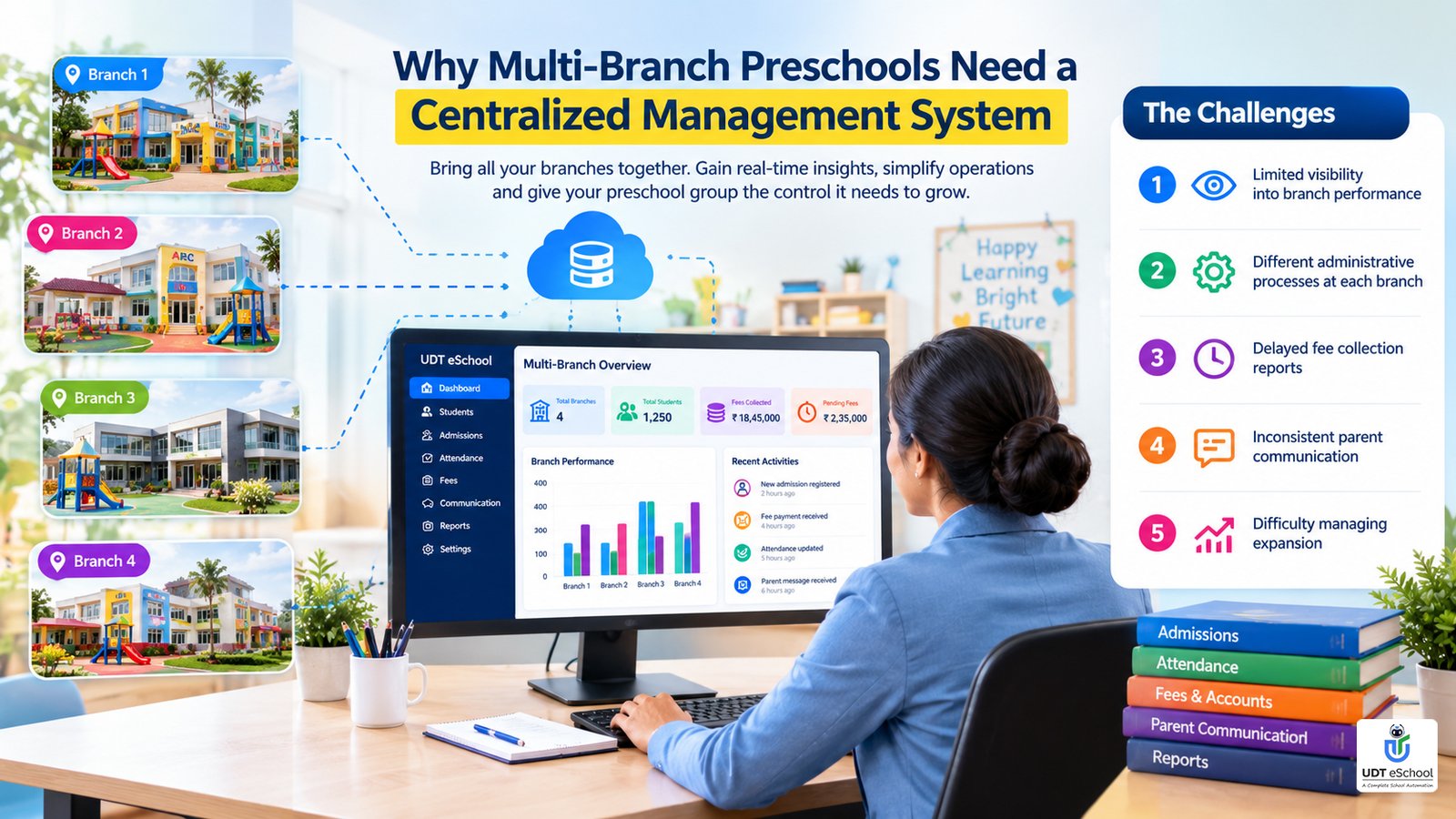
1. Limited visibility into branch performance
Management may know the total number of enrolled children but lack a timely view of admissions, attendance, fee collections or outstanding dues at individual branches.
A centralized system can help authorized users compare branch-level information using consistent reports.
2. Different administrative processes at each branch
One centre may maintain fee records in spreadsheets, another may use paper registers, and a third may use a separate application. Consolidating this information takes additional effort and makes comparisons difficult.
A common platform can help standardize processes while allowing appropriate branch-specific settings.
3. Delayed fee collection reports
When fee information is maintained separately, the head office may need to request reports from each centre before understanding the total amount collected or outstanding.
Centralized fee reporting can help management review collections, pending payments and branch-wise trends more efficiently.
4. Inconsistent parent communication
Parents expect timely information about school activities, notices, attendance and payments. If communication processes differ across branches, the parent experience may also differ.
A common communication system can help the group maintain consistent standards while allowing each branch to share relevant updates.
5. Difficulty managing expansion
Opening another preschool should not require the organization to rebuild its administrative process from scratch.
A scalable preschool management system should make it easier to add a branch, organize its records and include its performance in group-level reporting.
10 Features to Look for in Preschool Management Software
Not every preschool needs every available feature. The right selection depends on the number of branches, enrolment, staffing and the organization’s operating model.
The following checklist can help preschool owners and management teams evaluate potential solutions.
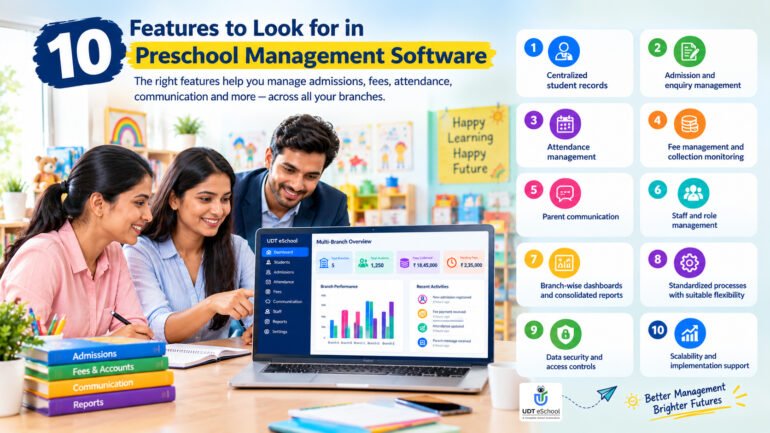
1. Centralized student records
The system should maintain organized student information, including enrolment details, class or group allocation, guardian contacts and relevant documents.
For a multi-branch group, management should also understand which branch is responsible for each student and who is authorized to access the record.
2. Admission and enquiry management
Admissions often begin with a phone call, website enquiry, walk-in visit or referral. If these enquiries are recorded in different places, follow-ups can be missed.
Look for a process that helps staff record enquiries, track follow-ups and monitor the journey from initial interest to confirmed admission.
Group-level reporting can help management compare enquiry and enrolment trends across centres.
3. Attendance management
Preschool staff need a straightforward way to record daily attendance and maintain accurate records.
Check whether the software supports the attendance process your centres actually use and whether authorized staff can access relevant records without unnecessary manual consolidation.
Do not assume that every system includes child check-in/check-out, authorized pickup verification or automatic parent alerts. Confirm each requirement during the product demonstration.
For a closer look at attendance automation and the requirements schools should consider, read our guide to the attendance management system for schools.
4. Fee management and collection monitoring
Fee administration is especially important when a group operates several centres with different enrolment levels or fee structures.
Useful capabilities may include:
- Configurable fee structures and payment schedules.
- Fee receipts and transaction records.
- Payment reminders and outstanding-dues reports.
- Branch-wise collection summaries.
- Consolidated reporting for head-office review.
- Appropriate permissions for fee entry, approvals and financial reporting.
Before selecting a platform, confirm how it handles online payments, payment reconciliation, refunds and the financial reports your organization needs.
For more information about fee automation, explore UDT eSchool’s school fee management software.
5. Parent communication
Preschool parents often want regular updates about notices, activities, attendance and school-related information.
A parent communication system can help staff share relevant information through supported channels and reduce dependence on scattered messages and manual follow-ups.
For groups, check whether the head office can communicate organization-wide while individual branches can send their own notices when required.
Choosing the right digital communication platform is equally important for families. Our guide to the best school app explains how school apps can support communication between schools and parents.
If your school is looking to simplify fee collection, payment tracking and outstanding dues, explore how school fee management software can help organize these financial activities.
6. Staff and role management
Different people need different levels of access. A branch administrator may need to manage local records, while a head-office administrator may need consolidated reports.
Role-based permissions can help restrict access to the information each user needs for their responsibilities.
Confirm how the system handles staff accounts, access changes and employee records before implementation.
7. Branch-wise dashboards and consolidated reports
This is one of the most important considerations for a growing preschool group.
The software should make it possible to examine individual branches and understand the overall organization without repeatedly collecting separate reports.
Depending on the platform, useful reports may cover:
- Enrolment and student strength by branch.
- Attendance trends.
- Fee collections and outstanding dues.
- Admission enquiries and conversions.
- Operational activity and administrative performance.
Check whether reports can be filtered by branch and date range, and whether the information is updated frequently enough for your management needs.
8. Standardized processes with suitable flexibility
A group may want every branch to follow common procedures while allowing differences in fee schedules, age groups, staffing or local requirements.
The software should make it clear which settings are controlled centrally and which can be managed at branch level.
This balance helps maintain consistency without forcing every centre into an unsuitable operating model.
9. Data security and access controls
Preschool records can contain personal information about young children and their families. Access should be limited to authorized users, and the organization should understand how information is stored, protected, backed up and exported.
Ask the provider about role-based permissions, data retention, account security, backup practices and the process for retrieving records if you change providers.
Also establish appropriate consent and privacy procedures for children’s photographs and other personal information. Consult the applicable Indian data-protection requirements rather than assuming that a software feature alone guarantees compliance.
10. Scalability and implementation support
A system that works for two branches should remain manageable as the organization expands.
Evaluate whether the provider can support additional centres, user accounts, records and reporting requirements. Also ask about data migration, staff training, onboarding, support response times and any additional charges.
The implementation process matters just as much as the feature list. A sophisticated system will not deliver its intended benefits if staff cannot use it consistently.
Standalone Preschool Software vs Multi-Branch Preschool Management Software
The distinction is not simply the number of features. It is whether the platform supports the way the organization operates.
| Requirement | Standalone preschool | Multi-branch preschool group |
|---|---|---|
| Student records | Records for one centre | Records organized across centres |
| Fee management | Local collections and dues | Branch-wise and consolidated reporting |
| Admissions | Local enquiries and follow-ups | Branch-level tracking with group visibility |
| Staff access | Centre-level permissions | Branch and head-office permissions |
| Reports | Centre performance | Individual branch and group-level views |
| Standard processes | One centre’s procedures | Consistent processes across branches |
| Expansion | May need additional setup | Should support adding centres without rebuilding the system |
A standalone centre may not need every centralized capability. However, an organization planning to expand should consider its future requirements before committing to a system that may be difficult to scale.
How to Choose the Right Preschool Management System
Before comparing vendors, document how your organization currently works and where the biggest administrative problems occur.
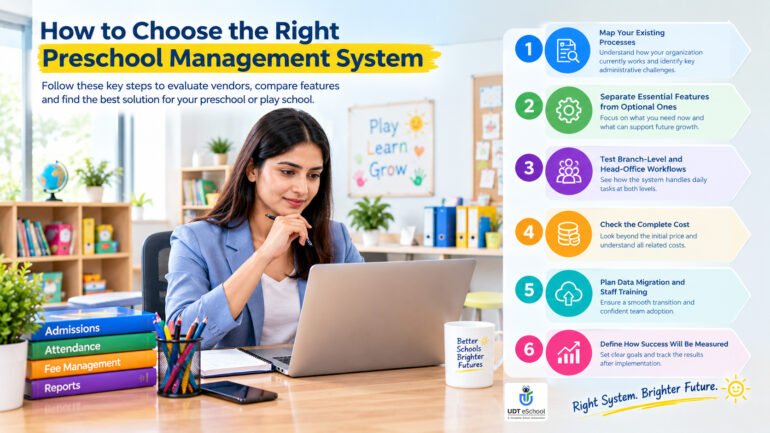
Step 1: Map your existing processes
List how each branch handles enquiries, admissions, attendance, fee collection, parent communication and reporting.
Identify tasks that require repeated data entry or manual coordination with the head office.
Step 2: Separate essential features from optional ones
Create two lists: features your organization needs immediately and capabilities that may become important as it grows.
This prevents the selection process from becoming a comparison of long feature lists that may not solve your actual problems.
Step 3: Test branch-level and head-office workflows
During a demonstration, ask the provider to show how a branch administrator completes everyday tasks and how the head office reviews consolidated information.
Use realistic examples, such as checking outstanding fees across branches or comparing enrolment for a selected month.
Step 4: Check the complete cost
Ask for a written quotation that explains implementation, training, subscriptions, user or branch limits, payment-related charges, support and future expansion.
Compare the total expected cost for your organization rather than choosing solely on the advertised starting price.
Step 5: Plan data migration and staff training
Confirm how existing student records, guardian details, fee balances and other necessary information will be transferred and checked.
Arrange practical training for administrators and staff, and decide who will handle user access, data quality and ongoing support.
If your organization is planning a wider technology upgrade, our digital transformation roadmap for schools offers further guidance on planning adoption and improving school operations.
Step 6: Define how success will be measured
Before implementation, record a baseline for the problems you want to improve. Depending on your current processes, this might include the time needed to prepare reports, the frequency of record discrepancies, the speed of enquiry follow-ups or the effort spent consolidating fee data.
Review these measures after implementation rather than assuming that adopting software automatically improves every process.
How UDT eSchool Can Support Preschool Administration
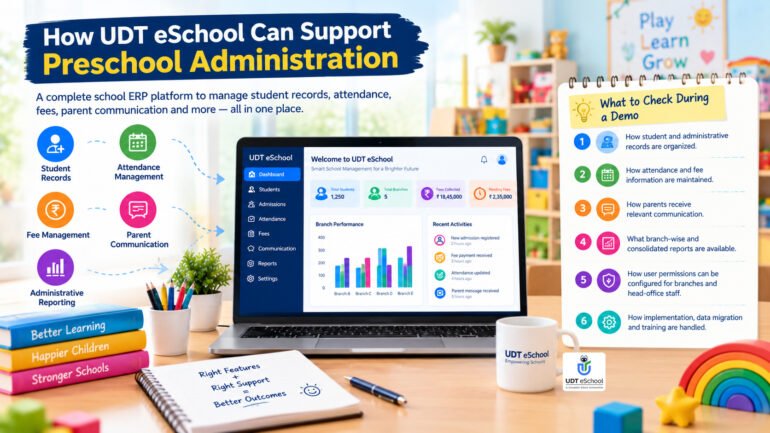
UDT eSchool offers a school ERP platform with capabilities relevant to student records, attendance, fee management, parent communication and administrative reporting.
To understand the broader capabilities available for managing school operations, visit our guide to school ERP software.
For preschool groups considering a centralized platform, the important step is to assess how the available modules fit the organization’s specific branch structure and daily workflows.
During a demonstration, ask to see:
- How student and administrative records are organized.
- How attendance and fee information are maintained.
- How parents receive relevant communication.
- What branch-wise and consolidated reports are available.
- How user permissions can be configured for branches and head-office staff.
- How implementation, data migration and training are handled.
Review the UDT eSchool school ERP solution and Best Play School App guide for related information.
The right choice should be based on demonstrated capabilities, the needs of your preschool group and the support available during implementation.
Frequently Asked Questions About Preschool Management Software
What is preschool management software?
Preschool management software is a digital platform for organizing activities such as student records, admissions, attendance, fee administration and communication with parents. The available features vary by provider.
Can preschool management software manage multiple branches?
Some systems support multiple centres through branch-level records, permissions and consolidated reporting. Confirm that the provider supports your required branch structure and can demonstrate the reports you need.
What features should a preschool management system include?
Common requirements include student records, admissions tracking, attendance, fee management, parent communication, staff access controls and reporting. Multi-branch groups should also evaluate consolidated dashboards and branch-level permissions.
Is preschool management software suitable for a small play school?
Yes. A small play school may benefit from digitizing admissions, attendance, fees and parent communication. The best solution is one that fits its current needs and budget without unnecessary complexity.
How much does preschool management software cost in India?
Pricing varies by provider, enrolment, number of branches, modules, implementation requirements and support. Request a written quotation that identifies recurring charges and any additional costs.
How can a preschool group monitor all branches from one place?
A suitable platform can provide authorized head-office users with consolidated reports while allowing each branch to maintain its operational records. Confirm which metrics are available and how frequently they are updated.
People Also Search For (PASF)
- Preschool management software in India
- Preschool management system for multiple branches
- Preschool fee management software
- Play school administration software
- Preschool admission management system
- School ERP software for small schools
- Centralized school management software
- Multi-branch school ERP software
Simplify Preschool Management with a More Connected System
As a preschool group grows, managing every centre through disconnected records and manual reports can become increasingly difficult. A suitable preschool management system can help organize essential workflows, improve visibility and give management a clearer view of branch operations.
The most effective approach is to identify your operational priorities, compare providers against those requirements and verify the important workflows during a demonstration.
Want to explore how UDT eSchool could support your preschool’s administrative needs?
📞 Book Your Demo: +91-9690343000 | 9711400141
Ready to Transform Your School?
Empower your institution with an intelligent School ERP that streamlines administration, strengthens parent engagement, automates routine tasks, and helps school leaders make data-driven decisions with confidence.

✔ Reviewed & Published
UDT eSchool Editorial Team
This article has been researched, reviewed, and published by the UDT eSchool Editorial Team, specialists in School ERP Software, NEP 2020 implementation, CBSE reforms, AI in Education, Competency-Based Assessment, Holistic Progress Cards, Parent Engagement, and Digital School Transformation.
Editorial Standards
✔ Official CBSE Circulars
✔ Ministry of Education Guidelines
✔ NCERT Frameworks
✔ Education Industry Best Practices
✔ Reviewed Before Publication
✔ Updated as Policies Change
Editorial Expertise
School ERPNEP 2020CBSE ReformsHolistic Progress CardCompetency-Based AssessmentAI in EducationSchool Management
Digital Transformation
Article Information
| Content Type | Expert Educational Guide |
| Reviewed By | UDT eSchool Editorial Team |
| Fact Checked | ✔ Yes |
| Primary Sources | CBSE, NCERT, Ministry of Education & NEP 2020 |
| Updated | October 2026 |
| Article Version | Version 1.0 |

Education Technology Consultant at UDt eSchool with 10+ years of experience helping schools digitize operations and implement CBSE-aligned systems.