Student Information System for Schools: Features and Benefits
Managing student information is one of the most important responsibilities of a school administration. From admission details and guardian contacts to attendance, academic progress and transfer records, schools handle a considerable amount of information throughout every academic year.
When these records are maintained in separate registers, spreadsheets, files and applications, retrieving accurate information can become difficult. Staff may have to enter the same details repeatedly, update multiple records and depend on different departments to obtain a complete picture of a student’s academic and administrative history.
A student information system for schools provides a more organised approach by bringing essential student-related information into a central digital environment. It helps authorised school personnel maintain, update and retrieve student records while supporting related administrative processes.
For school directors, principals, trustees and administrators, understanding how such a system works is important before selecting a software solution. The right platform should not simply store student details. It should support accurate recordkeeping, convenient information access, responsible data handling and smoother school administration.
Schools should refer to the applicable CBSE Affiliation Bye-Laws when establishing their student recordkeeping procedures.
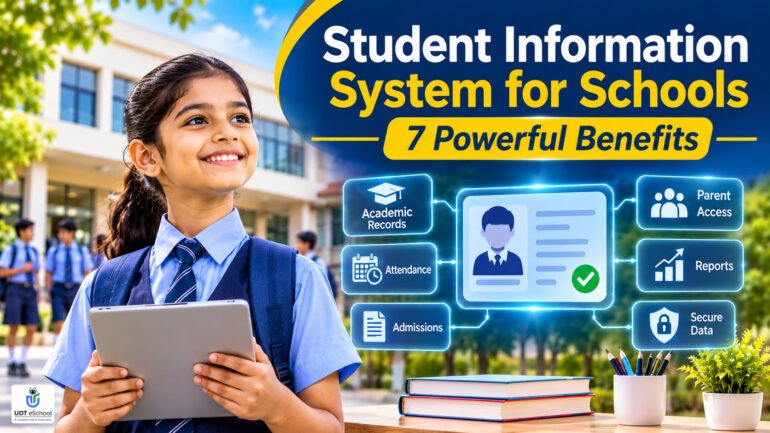
In this guide, we explore the essential features, seven important benefits, implementation considerations and practical questions schools should ask before investing in a student information system.
What Is a Student Information System for Schools?
A Student Information System (SIS) is a software solution designed to collect, organise, maintain and retrieve information related to students in an educational institution.
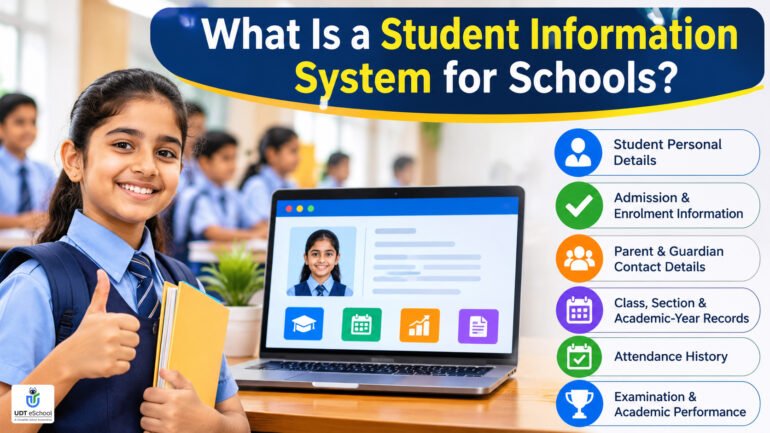
It provides a structured digital record of each student, allowing authorised users to access relevant information without searching through multiple physical registers or disconnected spreadsheets.
Depending on the software, a student information system may maintain:
-
Student personal and identification details.
-
Admission and enrolment information.
-
Parent and guardian contact details.
-
Class, section and academic-year records.
-
Attendance history.
-
Examination and academic performance records.
-
Transfer and promotion details.
-
Supporting documents and certificates.
-
Communication and administrative history.
The exact functionality depends on the software provider and the modules selected by the school.
Understanding a student information system through a practical example
Consider a school with 1,000 students.
The admission department maintains enrolment information, teachers maintain attendance records, examination staff handle academic results, and the administration maintains other student-related documents.
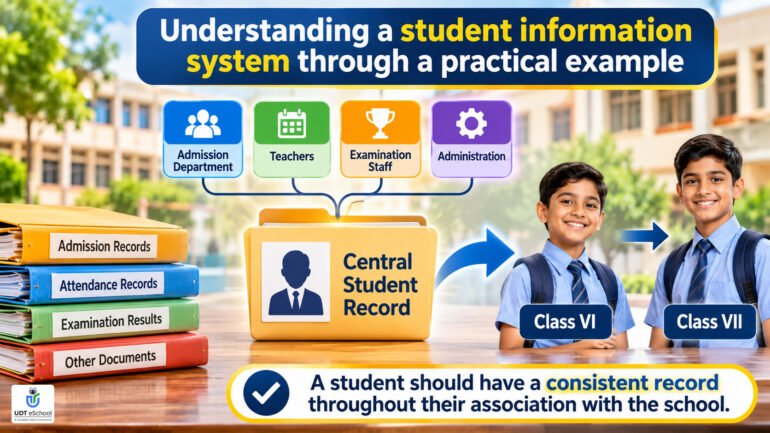
If these records are stored independently, retrieving a student’s complete history may require coordination between several departments.
With a properly configured student information system, the school can maintain a central student record and connect relevant information from different administrative processes.
For example, when a student moves from Class VI to Class VII, the school should be able to update the academic-year and class-allocation information without unnecessarily creating another disconnected student identity.
This improves continuity and makes student information easier to manage.
The important principle: A student should have a consistent record throughout their association with the school, even when their class, section or academic year changes.
Student Information System vs School ERP: What Is the Difference?
A common question among school management teams is whether a student information system and a school ERP are the same thing.
They are related, but their primary purposes are different.
A Student Information System focuses mainly on student-related data and records. A School ERP generally covers a wider range of institutional operations, including student management, finance, human resources, examinations, transport and communication.
Comparison between SIS and School ERP
| Parameter | Student Information System | School ERP |
|---|---|---|
| Primary purpose | Manage student information | Manage wider school operations |
| Student profiles | Core functionality | Usually included |
| Admission records | Common capability | Usually included |
| Guardian information | Common capability | Usually included |
| Attendance | May be included | Usually included |
| Academic records | Common capability | Usually included |
| Fee management | Depends on solution | Common module |
| Staff management | Usually limited | Common module |
| Payroll | Not generally core | Often included |
| Transport management | May be integrated | Often included |
| Parent communication | Depends on solution | Often integrated |
| Institutional reporting | Student-focused | School-wide |
Can a student information system operate independently?
Yes.
A school can use a standalone SIS when its primary requirement is maintaining student profiles, admission records, academic history and related information.
However, schools with more extensive administrative requirements may benefit from an integrated platform.
For example, student information can become more useful when connected with attendance, fee management, examinations, parent communication and other school processes.
This is where a broader school ERP platform can provide additional value.
An important distinction: A school does not necessarily need separate software for every administrative activity. It should first evaluate whether its existing ERP already provides adequate student information management.
10 Essential Features of a Student Information System
Not every student information system offers the same functionality. Some focus on basic recordkeeping, while others connect student information with broader academic and administrative processes.
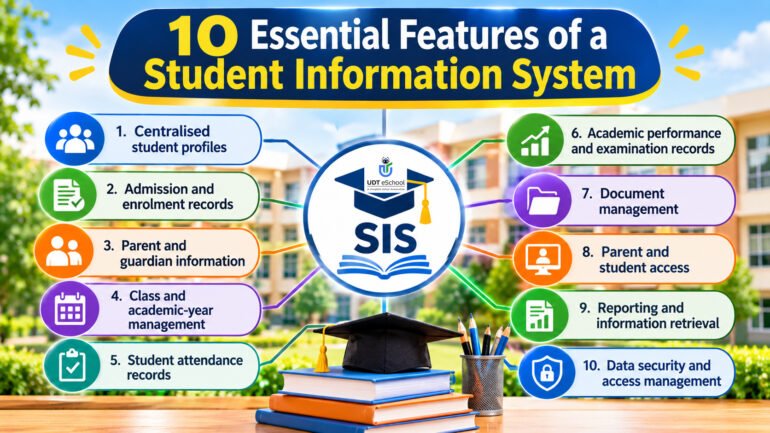
Before selecting a solution, school management should understand the features that can make student information easier to maintain and retrieve.
1. Centralised student profiles
A central student profile is one of the most important features.
It provides a structured location for maintaining essential information about each student.
A typical student profile may contain:
-
Student name and identification number.
-
Date of birth.
-
Admission number and admission date.
-
Current class and section.
-
Academic session.
-
Residential address.
-
Relevant identification details.
-
Student status.
The school should be able to retrieve the profile using appropriate search fields, such as admission number or student name.
A central profile also helps reduce the possibility of creating multiple records for the same student.
2. Admission and enrolment records
Admission information forms the foundation of a student’s administrative history.
An SIS should ideally support the recording and updating of:
-
Admission application details.
-
Admission number.
-
Date of admission.
-
Previous school information, where relevant.
-
Class of admission.
-
Enrolment status.
-
Supporting documents.
-
Withdrawal or transfer information.
Schools should also evaluate whether the software connects admission enquiries and registration workflows with the permanent student record.
This can reduce repeated data entry when an applicant becomes an enrolled student.
3. Parent and guardian information
Schools need accurate contact information to communicate with parents and guardians.
A student information system should provide suitable fields for maintaining:
-
Parent or guardian names.
-
Contact numbers.
-
Email addresses.
-
Residential addresses.
-
Emergency contact information.
-
Relationship with the student.
-
Authorised communication details.
Where a student has more than one guardian or authorised contact, the system should allow the school to maintain the relevant relationships clearly.
Access to this information should be restricted to authorised users.
4. Class and academic-year management
Student information changes as students progress through different academic stages.
A suitable system should support the management of:
-
Academic sessions.
-
Classes and sections.
-
Class allocation.
-
Roll numbers.
-
Student promotion.
-
Section changes.
-
Academic-year transitions.
-
Transfer and withdrawal status.
For example, when students move from Class VII to Class VIII, their existing records should remain connected to their student identity.
The school should be able to distinguish previous academic-year information from current information.
This is particularly useful when administrators need to retrieve historical records.
5. Student attendance records
Attendance is an important part of student administration.
A student information system may include attendance functionality or connect with a dedicated attendance module.
Depending on the solution, schools may be able to maintain:
-
Daily attendance.
-
Present and absent records.
-
Class-wise attendance reports.
-
Monthly attendance summaries.
-
Student attendance history.
-
Attendance notifications.
-
Attendance-related analysis.
For CBSE-affiliated schools, accurate attendance records are particularly important in the relevant secondary and senior secondary classes.
Schools should refer to the applicable CBSE Affiliation Bye-Laws
when establishing their recordkeeping procedures.
The software should support the school’s requirements, but responsibility for maintaining and verifying official records remains with the institution.
6. Academic performance and examination records
Student information becomes more valuable when administrative details can be viewed alongside academic progress.
Depending on the available modules, an SIS may connect with examination and assessment systems to maintain:
-
Examination results.
-
Subject-wise marks.
-
Grades.
-
Assessment records.
-
Academic progress.
-
Report cards.
-
Historical performance.
This allows authorised teachers and administrators to retrieve relevant academic information without depending entirely on separate files.
Schools should check whether the system supports their examination structure, grading requirements and reporting formats.
7. Document management
Schools maintain several documents during a student’s academic journey.
These may include:
-
Admission forms.
-
Birth certificates.
-
Previous school records.
-
Transfer certificates.
-
Photographs.
-
Medical or emergency information, where required.
-
Other supporting documents.
A document management feature can help organise these files against the relevant student profile.
However, schools should verify file-size limits, permitted formats, document retrieval, access permissions and backup arrangements.
A digital document repository should not automatically be treated as a replacement for legally required physical records or originals.
8. Parent and student access
Parents frequently require information about their children’s attendance, academic performance, school activities and other relevant updates.
A student information system may provide separate access through a web portal or mobile application.
Depending on the platform, parents may be able to view:
-
Attendance information.
-
Academic results.
-
Report cards.
-
Timetables.
-
Homework.
-
School notifications.
-
Other authorised student-related information.
Students may also receive access to selected academic information.
The school should ensure that each user sees only the information appropriate to their role and relationship with the student.
9. Reporting and information retrieval
School administrators often need to retrieve information for different purposes.
A reporting facility can help generate:
-
Class-wise student lists.
-
Admission summaries.
-
Student strength reports.
-
Attendance reports.
-
Academic-year reports.
-
Student status reports.
-
Transfer and withdrawal reports.
Useful reporting tools should allow authorised users to filter information according to relevant parameters.
Schools should also check whether reports can be exported in commonly used formats such as PDF or Excel.
10. Data security and access management
Student information is sensitive and should be handled responsibly.
A student information system should provide appropriate safeguards, including:
-
Role-based user permissions.
-
Secure authentication.
-
Restricted access to sensitive information.
-
Activity logs, where supported.
-
Secure data transmission.
-
Backup and recovery arrangements.
-
Defined data retention procedures.
Schools should not assume that cloud hosting alone guarantees security.
They should understand where data is stored, who can access it, how backups are managed and what procedures are followed in the event of a data breach.
7 Key Benefits of a Student Information System for Schools
The benefits of a student information system extend beyond replacing paper registers.
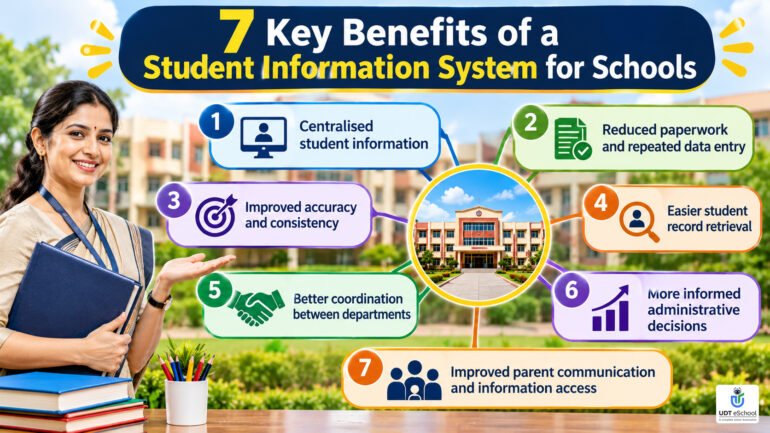
When properly implemented, it can improve record accuracy, reduce repetitive administrative work and make information more accessible to authorised stakeholders.
1. Centralised student information
One of the biggest advantages is the ability to maintain student information in an organised digital environment.
Instead of searching through multiple registers and spreadsheets, authorised staff can retrieve information from a central student record.
This makes everyday administrative work more manageable.
For example, when a principal needs to check a student’s admission details, class allocation and attendance history, the relevant information can be retrieved without contacting several departments individually.
2. Reduced paperwork and repeated data entry
Manual recordkeeping often requires the same student details to be entered in multiple places.
A student’s name, admission number, guardian details and class information may appear in admission registers, attendance sheets and examination records.
Repeated entry increases administrative effort and creates opportunities for mistakes.
A properly integrated system can reduce unnecessary duplication by allowing authorised modules to use consistent student information.
However, schools should check whether their selected software genuinely shares data between modules rather than simply providing separate digital forms.
3. Improved accuracy and consistency
Incorrect student information can affect several school processes.
A wrong contact number may prevent important communication. An incorrect date of birth can create documentation problems. Duplicate student profiles can result in inconsistent academic or administrative records.
A structured student database can improve consistency through:
-
Standardised data fields.
-
Mandatory information checks.
-
Unique student identification numbers.
-
Duplicate-record identification.
-
Controlled record updates.
-
Defined verification responsibilities.
Technology helps organise information, but staff must still verify the accuracy of the information entered.
4. Easier student record retrieval
School administrators regularly need historical student information.
This may be required when:
-
Parents request previous academic records.
-
Students change classes.
-
A student transfers to another institution.
-
The school prepares official reports.
-
An administrator checks admission details.
-
Management reviews enrolment trends.
A searchable student database can make retrieval more convenient.
It also reduces dependence on individual employees who may be the only people familiar with the location of particular records.
5. Better coordination between departments
Student information is used by several departments.
The admission team handles enrolment, teachers manage attendance and academic information, examination staff maintain assessment records, and administrators coordinate official documentation.
When these activities operate through disconnected systems, information may not remain consistent.
An integrated student information environment can improve coordination by allowing authorised departments to work with the same underlying student records.
This can reduce communication delays and repeated requests for information.
6. More informed administrative decisions
School management needs reliable information to plan academic and administrative activities.
Student-related reports can help administrators understand:
-
Class-wise student strength.
-
Admission and withdrawal trends.
-
Attendance patterns.
-
Academic performance.
-
Student progression.
-
Information gaps in existing records.
These insights can support better planning.
For example, class-wise enrolment reports can help management assess classroom capacity and plan staffing requirements.
However, reports should be interpreted in context. A software-generated report does not automatically establish the reason behind a particular trend.
7. Improved parent communication and information access
Parents expect timely and accurate information about their children.
When student information is connected with appropriate communication facilities, schools can reduce delays in sharing important updates.
For example, parents may receive authorised attendance notifications or access report cards through a school application.
This helps create a more transparent communication process between the school and families.
Schools should also ensure that communication permissions, guardian relationships and access rights are correctly configured.
How an SIS Fits into Daily School Administration
A student information system does not operate in isolation from the rest of the institution.
Its value depends partly on how effectively it connects with everyday school administration.
Consider the following example:
| Department | Student information requirement |
|---|---|
| Admission office | Enrolment and admission details |
| Administration | Student profiles and official records |
| Teachers | Class allocation and attendance |
| Examination department | Assessment and academic history |
| Accounts department | Student-linked fee information, if integrated |
| Transport department | Relevant transport allocation, if integrated |
| Parents | Authorised academic and administrative updates |
| Principal | Consolidated student-related reports |
A broader school management software solution
may connect several of these processes within a common environment.
The important consideration is whether the software provides the integration and reporting capabilities the school actually requires.
A practical example: Updating a student’s information
Suppose a parent informs the school that their residential address and contact number have changed.
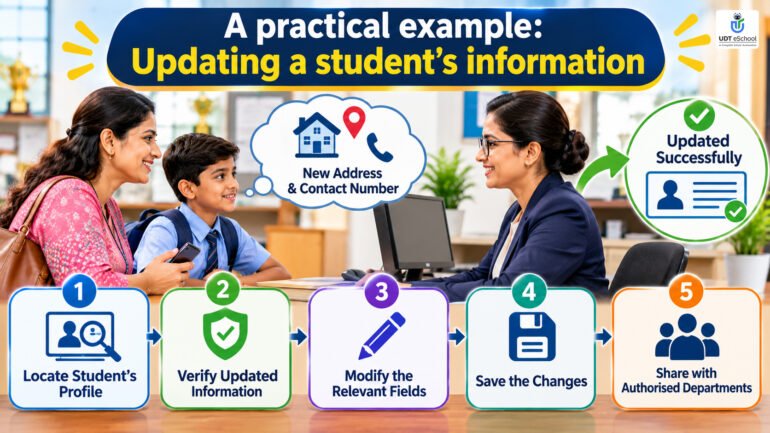
In a manual environment, the administration may need to update several registers, spreadsheets and communication lists.
In a properly configured digital system:
-
An authorised employee locates the student’s existing profile.
-
The updated information is verified.
-
The relevant fields are modified.
-
The change is saved against the existing student record.
-
Authorised departments can access the updated information according to their permissions.
This process helps maintain consistent information without unnecessarily creating another student profile.
Important Considerations for Indian Schools
Indian schools may need to maintain student records for different administrative, academic and regulatory purposes.
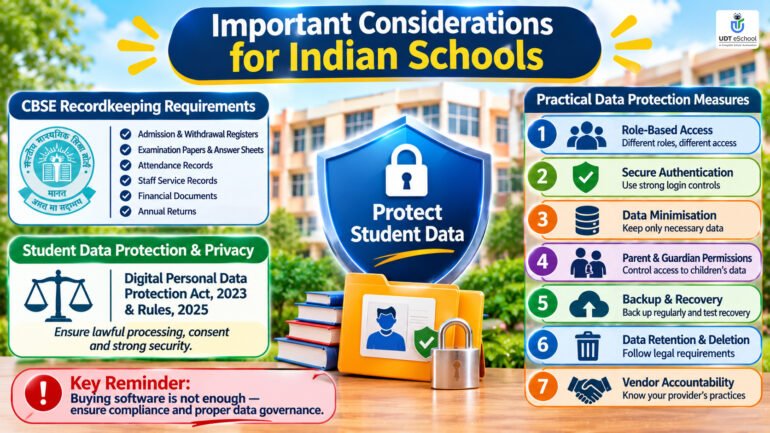
A student information system should therefore be evaluated against the school’s actual obligations rather than a generic feature checklist.
CBSE recordkeeping requirements
CBSE’s Affiliation Bye-Laws include provisions relating to school records and documentation.
Clause 14.19 identifies records such as:
-
Admission and withdrawal registers.
-
Examination question papers and answer sheets.
-
Records of student attendance, particularly for relevant board examination classes.
-
Staff service records.
-
Financial documents.
-
Annual returns submitted through specified portals.
Schools should consult the current official bye-laws and applicable circulars to determine their specific obligations.
A digital system can support organised recordkeeping, but schools must ensure that the prescribed registers, verification procedures and retention requirements are followed.
Student data protection and privacy
Student information includes personal data, and schools must take appropriate steps to protect it.
India’s Digital Personal Data Protection Act, 2023 and the Digital Personal Data Protection Rules, 2025 provide an important framework for the processing and protection of digital personal data.
The framework addresses matters such as lawful processing, consent, security safeguards and the handling of children’s personal data.
Schools should examine the Digital Personal Data Protection Act, 2023 and the Digital Personal Data Protection Rules, 2025
The Act and Rules have phased commencement provisions. Schools should verify which requirements are in force at the relevant time and obtain appropriate legal guidance for their circumstances.
Practical data protection measures for schools
School management should pay particular attention to:
1. Role-based access
Teachers, administrators, principals and parents should not automatically have identical access rights.
2. Secure authentication
User accounts should have appropriate authentication controls, with access removed when an employee leaves or changes responsibilities.
3. Data minimisation
Collect only information that the school has a legitimate need to maintain.
4. Parent and guardian permissions
Verify guardian relationships and ensure that access to children’s information is appropriately controlled.
5. Backup and recovery
Confirm how frequently data is backed up, where backups are stored and how recovery is tested.
6. Data retention and deletion
Establish procedures for retaining, archiving and deleting information in accordance with applicable legal and institutional requirements.
7. Vendor accountability
Understand the software provider’s responsibilities, data-processing arrangements, security practices and incident-reporting procedures.
A school should never assume that purchasing software automatically makes its data protection practices compliant.
How to Implement a Student Information System Successfully
Selecting software is only one part of the implementation process.
The school must also organize existing records, establish responsibilities, train staff and monitor the quality of information after implementation.
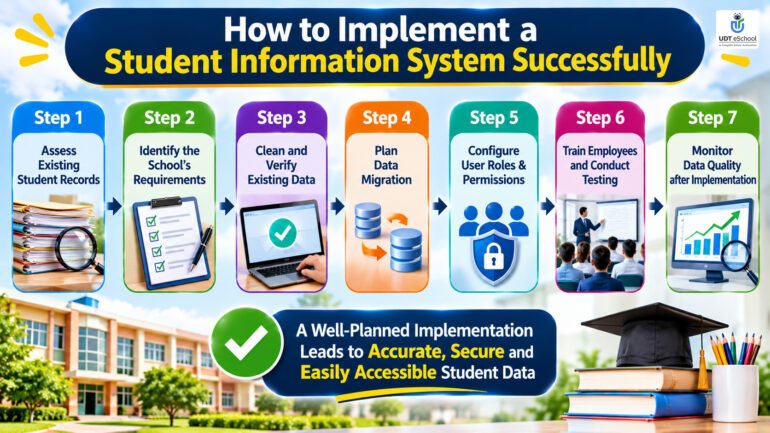
The following seven steps provide a practical starting point.
Step 1. Assess existing student records
Begin by reviewing how student information is currently maintained.
Identify:
-
Physical admission registers.
-
Excel spreadsheets.
-
Attendance records.
-
Academic records.
-
Parent and guardian information.
-
Supporting documents.
-
Transfer and withdrawal records.
The objective is to understand where information is stored and which records need to be consolidated.
Step 2. Identify the school’s requirements
Different institutions have different requirements.
A small school may need a basic student database, admission records and attendance management.
A larger school may require multi-user access, historical records, examination integration, reporting and parent communication.
Prepare a list of essential and optional requirements before approaching vendors.
Step 3. Clean and verify existing data
Do not transfer every existing spreadsheet into the new system without reviewing it.
First:
-
Identify duplicate student entries.
-
Correct spelling errors.
-
Verify admission numbers.
-
Check guardian contact information.
-
Review incomplete records.
-
Confirm academic-year details.
-
Identify outdated information.
Data migration provides an opportunity to improve record quality.
Step 4. Plan data migration
Discuss the migration process with the software provider.
Ask:
-
Which file formats are supported?
-
Can existing Excel records be imported?
-
How are duplicate records identified?
-
Can historical academic records be retained?
-
How are documents transferred?
-
Can the school review migrated information before launch?
The school should maintain a verified backup of its original records until the migration has been checked and accepted.
Step 5. Configure user roles and permissions
Determine who will be responsible for different activities.
For example:
| User | Suggested responsibility |
|---|---|
| Principal | Overall monitoring and authorised reporting |
| Administrator | Student records and administrative updates |
| Admission staff | New enrolments and admission information |
| Teachers | Assigned class information and attendance |
| Examination staff | Relevant academic records |
| Parents | Access to authorised information about their children |
Actual permissions should be based on the school’s policies and the software’s capabilities.
Step 6. Train employees and conduct testing
Before full implementation, provide practical training to the relevant staff.
Test common activities, including:
-
Adding a new student.
-
Updating guardian details.
-
Changing class allocation.
-
Recording attendance.
-
Retrieving previous records.
-
Generating reports.
-
Managing user access.
A pilot implementation with selected classes or departments can help identify issues before a wider rollout.
Step 7. Monitor data quality after implementation
Implementation should not end when the software becomes operational.
The school should periodically review:
-
Missing student information.
-
Duplicate records.
-
Incorrect contact details.
-
Unauthorised access.
-
Incomplete academic records.
-
Backup status.
-
Staff adoption.
-
Reporting accuracy.
Assigning clear ownership of student records helps maintain long-term reliability.
How to Choose the Right Student Information System: Vendor Evaluation Checklist
A software demonstration can make almost any platform appear impressive.
However, school management should evaluate how the software performs during actual administrative activities rather than relying only on a presentation.
Use the following questions when comparing vendors.
15 questions to ask before purchasing
| No. | Evaluation question |
|---|---|
| 1 | Can the system maintain a central student profile? |
| 2 | Can it manage admission and enrolment records? |
| 3 | Can multiple guardian details be maintained? |
| 4 | Does it support class and academic-year transitions? |
| 5 | Can previous student records be retrieved? |
| 6 | Does it include attendance management or integrate with an existing system? |
| 7 | Can examination and academic records be maintained? |
| 8 | Does it support document uploads and retrieval? |
| 9 | Can duplicate student profiles be identified? |
| 10 | Can existing Excel data be migrated? |
| 11 | Does it provide role-based access permissions? |
| 12 | Can authorised users generate customised reports? |
| 13 | What backup and disaster-recovery arrangements are available? |
| 14 | What are the implementation, training and ongoing support arrangements? |
| 15 | What is the complete cost, including customisation and additional modules? |
What should schools test during a software demonstration?
Rather than asking a vendor to show only the dashboard, request a practical demonstration of the following workflow:
-
Create a new student record.
-
Add parent and guardian information.
-
Upload supporting documents.
-
Allocate the student to a class.
-
Record attendance.
-
Retrieve academic information.
-
Update student details.
-
Generate a student-related report.
-
Demonstrate parent access.
-
Show how permissions and backups are managed.
This provides a better understanding of how the system will function in everyday school operations.
A useful buying principle: Choose software based on how well it handles your actual student-record workflows, not simply how many features appear in its product brochure.
Common Challenges Schools Face When Managing Student Information
Even schools that have adopted digital tools may experience difficulties when information is not properly organised.
Understanding these challenges helps management identify what needs improvement.
| Common challenge | Practical solution |
|---|---|
| Student details stored in multiple spreadsheets | Maintain a central student record |
| Duplicate student profiles | Use unique admission identifiers and verification |
| Outdated guardian information | Establish regular verification procedures |
| Difficulty retrieving previous records | Maintain searchable historical information |
| Repeated data entry | Integrate relevant administrative modules |
| Unauthorised access | Configure role-based permissions |
| Incomplete document records | Use structured document checklists |
| Staff dependency on manual processes | Provide training and standardised workflows |
| Data loss concerns | Verify backup and recovery procedures |
A digital platform can address many administrative inefficiencies, but successful results depend on accurate data, proper configuration and consistent staff participation.
How UDT eSchool Supports Student Information Management
UDT eSchool provides school ERP and management solutions designed to bring different school operations into a more organised digital environment.
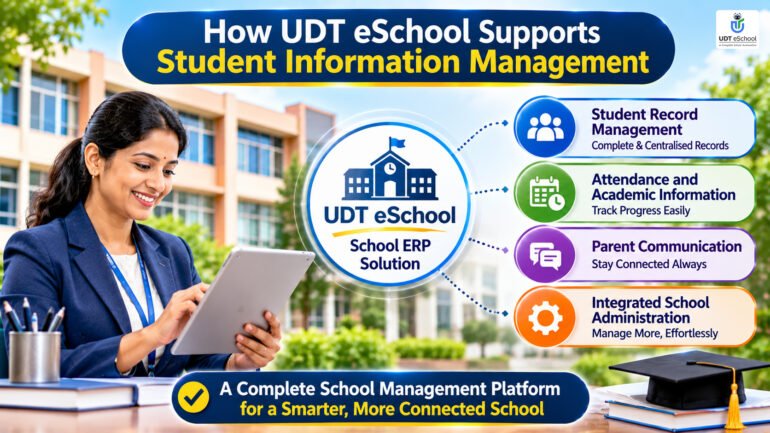
Its published website describes student management capabilities and related facilities such as student and staff record maintenance, attendance records, academic information, parent access and reporting.
The broader platform also covers areas such as admission management, examinations, communication and other school administrative functions.
For schools evaluating student information management, the relevant areas to explore include:
Student record management
The school should examine how student information is maintained and retrieved, including the availability of historical records and the processes for updating information.
Attendance and academic information
UDT eSchool’s published materials describe attendance facilities and academic result-related functionality. Schools should evaluate how these modules connect with student records and whether their specific reporting requirements are supported.
Parent communication
The UDT eSchool school mobile app provides a communication interface for parents and schools, with published features including attendance information, report cards, timetables, notifications and other school-related information.
Integrated school administration
Schools looking beyond student recordkeeping can explore the broader UDT eSchool School ERP solution
An integrated platform may help schools connect student-related information with other administrative activities, depending on the selected modules and configuration.
Before making a decision: Ask the UDT eSchool team to demonstrate the exact student information features, document management facilities, historical record access, user permissions, data migration and backup arrangements required by your institution. Do not assume every capability is included in every configuration.
What Is the Future of Student Information Management in Schools?
Student information management is gradually becoming more connected with wider school administration and digital transformation initiatives.
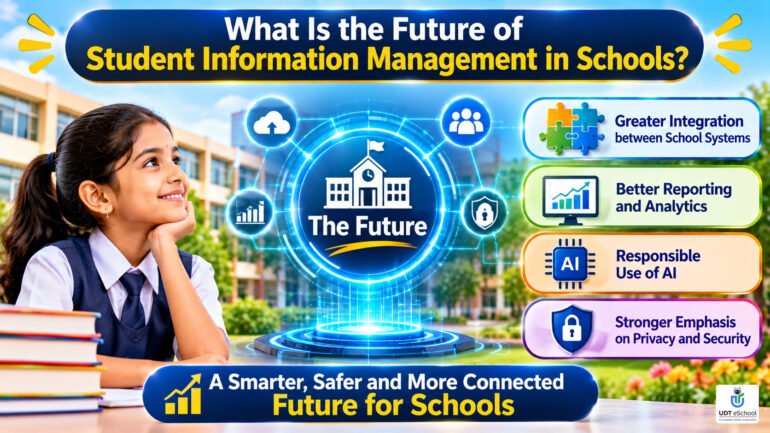
The next stage is not simply converting paper records into digital files. It is creating a reliable information environment where authorised stakeholders can use accurate data to support administrative and academic processes.
Several developments are worth watching.
Greater integration between school systems
Student information may increasingly connect with attendance, examinations, admission management, fee administration and parent communication.
This can reduce fragmented workflows and make information easier to retrieve.
Better reporting and analytics
School administrators can use consolidated information to understand enrolment trends, attendance patterns and academic progress.
The quality of these insights depends on the accuracy and completeness of the underlying data.
Responsible use of AI
AI-enabled tools may help identify unusual patterns, organise information and support administrative reporting.
However, sensitive decisions about students should remain subject to appropriate human oversight.
AI-generated insights should not replace professional judgement or verified records.
Stronger emphasis on privacy and security
As schools maintain more information digitally, responsible data handling becomes increasingly important.
Access permissions, data minimisation, security safeguards and appropriate retention policies should form part of the school’s technology planning.
A future-ready school needs more than digital software. It needs reliable processes, trained employees and a responsible approach to information management.
Conclusion: Build a More Organised Student Information Environment
Student information is central to almost every school administrative activity.
When admission details, guardian information, attendance, academic history and supporting documents are maintained through disconnected systems, retrieving accurate information can become unnecessarily difficult.
A well-designed student information system for schools provides a structured approach to maintaining these records, reducing repeated data entry and improving access for authorised users.
However, selecting the right solution requires more than comparing feature lists. Schools should examine data accuracy, integration, security, reporting, migration, training and long-term support.
For institutions with wider administrative requirements, an integrated school ERP may provide a more suitable approach than a standalone student database.
The objective should be simple: maintain reliable student information, make it accessible to the right people and support better-informed school administration.
Explore UDT eSchool for Your School
If your institution is looking to organise student information and streamline related administrative processes, explore the solutions offered by UDT eSchool.
Discuss your school’s requirements, review the available modules and request a practical demonstration before deciding which configuration is appropriate.
Book Your Demo: +91-9690343000 | 9711400141
Visit: UDT eSchool
Frequently Asked Questions (FAQs)
1. What is a Student Information System for schools?
A Student Information System is software that helps schools maintain, organise and retrieve student-related information, including admission details, personal profiles, guardian contacts, attendance and academic records.
2. Is a Student Information System the same as a School ERP?
No. An SIS primarily focuses on student information and records. A School ERP covers a wider range of school operations, which may include student management, fees, staff administration, examinations, transport and communication. Many ERP systems include student information management as a core module.
3. What are the most important features of a student information system?
Important features include centralised student profiles, admission records, guardian information, class allocation, attendance management, academic records, document organisation, reporting and access controls.
The exact feature set varies between software providers.
4. Can a student information system manage attendance?
Yes, many systems include attendance management or integrate with a separate attendance module. Schools should check whether the solution supports daily attendance, class-wise reports, historical records and parent notifications where required.
5. Is student information management software suitable for small schools?
Yes. Smaller schools can benefit from organised student profiles, admission records, contact information and digital recordkeeping. The software should be selected according to the institution’s size, requirements and budget.
6. How does a student information system help teachers?
Depending on their access permissions, teachers may be able to retrieve assigned class information, view student details, record attendance and access relevant academic records. This can reduce the time spent searching through separate documents.
7. Can parents access student information online?
Some student information systems provide parent portals or mobile applications. These may allow parents to access authorised information such as attendance, report cards, timetables and school notifications.
Schools should verify the access controls and supported features before selecting a platform.
8. How is student information protected in a digital system?
Protection may involve secure authentication, role-based access, encryption, activity logs, backups and controlled data sharing. Schools should evaluate the vendor’s security practices and ensure that their own data-handling procedures meet applicable requirements.
9. Can existing student records be transferred into a new system?
Many systems support data migration from spreadsheets or other software. However, schools should confirm supported formats, historical record migration, document transfer, duplicate identification and data verification procedures with the vendor.
10. Does a student information system help with CBSE recordkeeping?
It can support the organisation and retrieval of student-related information, including admission, attendance and academic records. However, schools must independently ensure that their recordkeeping practices comply with applicable CBSE bye-laws, circulars and retention requirements.
11. How much does student information management software cost in India?
Pricing varies according to the number of students, modules, users, customisation, hosting, implementation and support requirements. Schools should request a complete quotation rather than comparing only the initial subscription or licence price.
12. Should a school purchase a separate SIS if it already uses School ERP software?
Not necessarily. If the existing ERP adequately manages student profiles, admission records, attendance, academic history and related workflows, a separate SIS may not be required.
The school should first identify the gaps in its existing system.
People Also Search For (PASF)
-
What is a student information system in education?
-
What is the difference between SIS and school ERP?
-
What are the benefits of student information management software?
-
How can schools maintain digital student records?
-
What is a student database management system?
-
How do schools manage student admission records?
-
What features should school student management software have?
-
How can schools manage student attendance digitally?
-
How can schools protect student information online?
-
What is the best way to organise student records in schools?
-
How can schools migrate student records from Excel to software?
-
What should schools check before purchasing student management software?
Ready to Transform Your School?
Bring your school’s key operations together with an intelligent School ERP. Simplify administration, organise information, strengthen parent engagement and support better decisions with connected digital processes.
 ✔ Editorially Reviewed
UDT eSchool Editorial Team
This article has been prepared and reviewed by the UDT eSchool Editorial Team, which covers topics related to School ERP Software, school administration, education technology, CBSE reforms, assessment practices, parent engagement and digital school transformation.
✔ Reliable education-sector information
✔ Practical relevance for Indian schools
✔ Clear and informative explanations
✔ Editorial review before publication
✔ Updates when relevant information changes
Digital Transformation
| Content Type | Educational Guide |
| Reviewed By | UDT eSchool Editorial Team |
| Primary Sources | Add the official sources actually used in this article |
| Last Updated | 25 November 2026 |
| Article Version | Version 1.0 |

Education Technology Consultant at UDt eSchool with 10+ years of experience helping schools digitize operations and implement CBSE-aligned systems.